


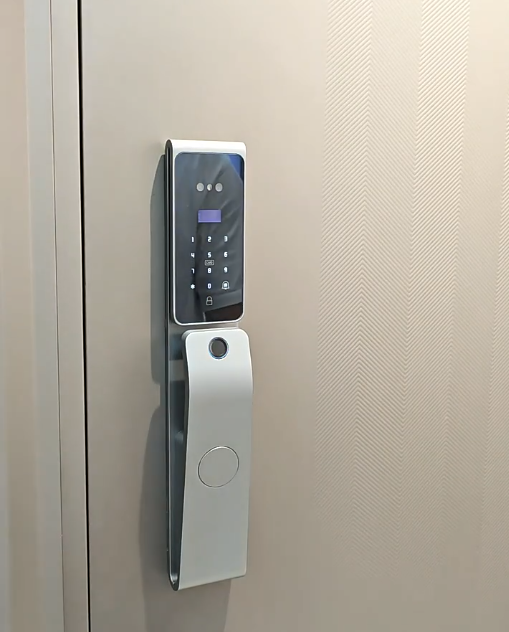
Buying your first smart lock can feel overwhelming — face recognition, Wi-Fi, mortise sizes, apps. This smart door lock buying guide from Covlor® breaks the decision into seven simple steps, so you choose the right lock for your door, your budget, and your security needs the first time.
Step 1: Measure Your Door
Before anything else, check your door. Note the thickness, whether it opens left or right, the material (wooden, metal, or uPVC), and the existing lock cutout or mortise size (commonly 6068 in India). Most Covlor® locks fit standard doors, but confirming the fit avoids surprises.
Step 2: Choose Your Unlock Methods
Decide how you want to get in. Options include fingerprint, face recognition, PIN code, RFID card, smartphone app, and a mechanical key backup. More methods mean more flexibility for family, guests, and staff. If you are unsure between biometrics, compare fingerprint vs face recognition.
Step 3: Wi-Fi or Bluetooth?
Choose Wi-Fi if you want remote lock/unlock and instant alerts from anywhere. Bluetooth-only locks are fine if you only need control near the door. For most homes and offices, Wi-Fi (often via the Tuya or TTLock app) is worth it.
Step 4: Check the Security Features
A good lock protects, not just opens. Look for encrypted access, tamper and forced-entry alarms, anti-peep passwords, and lockout after failed attempts. Our guide to the best smart door lock for home security covers these in detail.
Step 5: Battery Life & Backup
Smart locks run on rechargeable or AA batteries lasting several months, with low-battery alerts. Make sure yours includes a mechanical key and an emergency USB power port so you are never locked out.
Step 6: Warranty & Installation
Every Covlor® Smart AI Door Lock comes with a 2-year warranty covering manufacturing defects, plus free professional installation on orders of two or more locks in Bihar (within 7–10 days of delivery). Reliable after-sales support matters as much as the hardware.
Step 7: Match Budget to Value
Set a budget, then pick the lock that covers your must-have features. You do not always need the most expensive model — you need the right features for your door and lifestyle. Review the benefits of smart door locks to prioritise.
Quick Buying Checklist
| Check | What to Confirm |
|---|---|
| Door fit | Thickness, handing, mortise size |
| Unlock methods | Fingerprint, face, PIN, card, app, key |
| Connectivity | Wi-Fi for remote control |
| Security | Encryption, alarms, lockout |
| Backup | Key + emergency USB power |
| Support | Warranty + installation |
Recommended Covlor® Models
The CR L51-S is the best all-round starting point, the CR L88 suits push-pull doors, and the CR L45 is a compact option. See everything in the smart lock shop.
Why Getting the Choice Right Matters
A smart door lock is something you touch several times a day for years, and it guards your most important door — so the right choice pays off daily, while the wrong one frustrates the whole household. The seven steps above cover the essentials; the deeper guidance below helps you compare models confidently and avoid the mistakes that catch first-time buyers out.
Before anything else, be honest about what your home actually needs. A small family wanting simple keyless entry has very different priorities from someone managing guests, staff and deliveries, or running a rental. Matching the lock to real needs — not the longest spec sheet — is the foundation of a good buy.
Understand the Types of Smart Lock
Smart locks come in a few broad forms: keypad locks (PIN only), biometric locks (fingerprint, face or palm), card/RFID locks, and full smart locks that combine these with app connectivity. There are also formats for different doors — mortise locks for main doors, rim locks for lighter doors, and specific types for sliding and glass doors.
Most Indian homes are best served by a biometric smart lock on a mortise body, which combines fast everyday entry with a strong multi-bolt mechanism. Knowing which type suits your door and lifestyle narrows the field quickly. Our biometric door lock guide explains the biometric options in depth.
Biometrics: Capacitive vs Optical Sensors
The single biggest quality difference between fingerprint locks is the sensor. Cheap optical sensors photograph the finger and struggle with dry, cold or damp skin — the source of most “it won’t read my finger” complaints. Capacitive sensors read the electrical ridge pattern and work reliably across skin conditions. Covlor uses capacitive sensors for dependable first-touch reads.
If a lock’s listing doesn’t state the sensor type, treat that as a warning sign. A capacitive sensor costs a little more but saves daily frustration. Our fingerprint locks guide covers sensor quality and enrolment tips.
Face and Palm Recognition: Worth It?
Face recognition opens the door hands-free — ideal when you arrive carrying bags or a child — while palm recognition offers touch-free, hygienic entry that works even when fingers are wet or dirty. The best locks use 3D face sensing with liveness detection to resist photo spoofing.
Covlor builds face and palm recognition across its lineup as standard rather than a premium add-on, so every household member has a convenient method. If hands-free entry matters to you, prioritise a lock that offers it on a secure, 3D basis.
Connectivity: Wi-Fi, Bluetooth and the App
Connectivity decides what you can do remotely. Wi-Fi lets you unlock from anywhere, receive real-time alerts and view access logs; Bluetooth suits simple local phone unlocking. Covlor locks pair with the widely used Tuya and Smart Life apps, giving you a mature, regularly updated platform that also connects with other smart-home devices.
If you travel, manage deliveries or want to let guests in while out, choose a Wi-Fi model. If you only want keyless entry at the door, an offline lock is simpler and cheaper. Our Wi-Fi smart lock guide explains what connectivity adds.
Battery Life and Emergency Power
A smart lock runs on its own battery, independent of mains power. Covlor locks use a rechargeable lithium battery — 4000 mAh and 5000 mAh packs with USB charging — lasting roughly 6 to 10 months per charge, so you recharge only a couple of times a year. The lock warns you well before power runs low.
Crucially, check for emergency backup: Covlor locks offer emergency USB-C power (touch a power bank to open) plus a concealed mechanical key, so a flat battery never means a lockout. Never buy a lock without a clear backup path.
Door Compatibility and Mortise Size
A great lock is useless if it doesn’t fit. Confirm the lock supports your door’s thickness — a 40–120 mm range covers most Indian doors — and matches your mortise. India’s most common mortise is the 6068 size, which most Covlor locks are built around; older or imported doors may use other sizes.
Measure your door’s thickness and note the mortise before buying, and check whether it’s wooden, metal or a flat door. A clean fit protects the motor and battery life. Our installation guide covers fitting in detail.
Security Features That Actually Matter
Beyond biometrics, look for a multi-bolt body (4–5 bolts) that resists forcing, anti-tamper hardware, anti-peep PIN entry (padding your real code with random digits), wrong-attempt lockout, and anti-spoofing biometrics with liveness detection. On connected models, a tamper alarm and real-time alerts add active protection.
Covlor also drives its bolts with an all-metal gear motor rather than a rotating handle, which lasts roughly twice as long as plastic-geared motors and enables auto-lock. These features turn convenient keyless entry into genuinely secure entry.
Common Buying Mistakes to Avoid
A few errors catch out first-time buyers: fixating on the lowest price and ending up with plastic gears that strip within a year; ignoring the sensor type; overlooking emergency power; buying an unbranded import with no Indian warranty or support; and paying for premium features they’ll never use.
Avoid these by weighing value over price, insisting on quality where it matters, skipping extras that don’t serve you, and buying from a brand with genuine local support. Our brands guide explains how to judge a brand.
Think in Total Cost of Ownership
The smartest way to compare locks is total cost of ownership: purchase price plus running costs, weighed against durability and support over the lock’s life. A lock that costs a little more but lasts years, runs on cheap USB charging and is backed by local service usually beats a bargain that needs replacing.
With that lens, a well-built smart door lock is a one-time investment in daily convenience and security, not a recurring expense. Covlor’s lineup is built around exactly these priorities — durable motor, quality biometrics, strong body and real support — from around ₹24,000.
Installation: DIY or Professional?
Some confident owners fit a smart lock themselves on a standard door in an hour or two, using the supplied template and fixings. But metal, glass or unusually built doors — and any case where the existing hole doesn’t match — are best left to a professional, who ensures the bolt seats cleanly so the motor isn’t strained on every cycle.
For a main door especially, a precise fit protects your investment and keeps battery life high, so professional installation is often money well spent. Factor fitting into your budget when comparing models.
Warranty and After-Sales Support
A smart lock is an electronic device, so warranty and reachable support matter as much as the hardware. Confirm the warranty terms and how to reach help before buying. Covlor is an Indian brand offering genuine warranty and local service, so a problem is fixed rather than leaving you with a dead lock — unlike unbranded imports that disappear after the sale.
A quick check of reviews mentioning reliability over time, not just first impressions, tells you whether a brand stands behind its product.
Comparing Models Side by Side
Once you’ve shortlisted two or three locks, compare them on the things that matter rather than headline features: the fingerprint sensor type, whether face and palm recognition are included, the motor material, battery type and life, the door-thickness range, and the warranty and support. Put these in a simple table and the right choice usually becomes obvious.
Beware of locks that hide these details — a vague spec sheet often means corners cut. A brand that states its sensor, motor and battery clearly, as Covlor does, is usually the more trustworthy one, and makes an informed comparison possible.
Frequently Asked Questions
How do I choose a smart door lock?
Measure your door, decide your unlock methods, choose Wi-Fi or Bluetooth, verify the security features, and check the warranty and installation support. This buying guide walks through each step.
Will a smart lock fit my door?
Most Covlor® locks fit standard Indian doors with a 6068 mortise. Confirm your door thickness and handing before ordering, or contact support with your measurements.
Is Wi-Fi necessary in a smart lock?
Not essential, but recommended. Wi-Fi enables remote unlocking and instant open-door alerts, which most homeowners find very useful.
What warranty do Covlor smart locks have?
A 2-year warranty on manufacturing defects, plus free installation on orders of two or more locks in Bihar within 7–10 days of delivery.
Ready to choose your lock?
Browse Covlor® Smart AI Door Locks with a 2-year warranty and professional installation support across India.
