


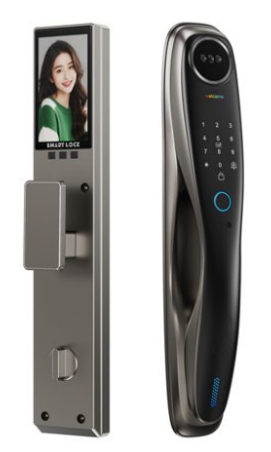
If you have ever wondered exactly how smart door locks work, this beginner guide explains everything in plain language — no jargon required. By the end, you will understand what happens inside the lock the moment you touch it, how it stays secure, what powers it, and whether it will work on your door. (For the bigger picture, see our complete guide to smart door locks.)
How Smart Door Locks Work: The Simple Version
At its heart, a smart door lock does two things: it confirms you are allowed in, and then it physically opens the door. Instead of a metal key turning a cylinder, you identify yourself with a fingerprint, your face, a PIN, a card, or your phone. The lock checks that input against its list of authorised users and, if it matches, a small electric motor slides the bolt open. The whole process takes under a second.
The Three Core Parts of a Smart Lock
Every Covlor® smart lock — and every good smart lock — is built around three parts:
- The verification system — the fingerprint sensor, camera, keypad, or radio that reads your input.
- The controller — a small chip that compares your input to stored, authorised profiles and makes the decision.
- The motorised bolt (electronic lock mechanism) — the motor and deadbolt that physically secure or release the door.
Step by Step: What Happens When You Unlock
Picture yourself walking up to the door. You place a finger on the sensor. The sensor captures the fingerprint pattern and passes it to the controller. The controller compares it to the enrolled fingerprints and confirms a match in a fraction of a second. It then signals the motor, which retracts the bolt, and the door opens. The event is saved to the lock log, and on connected models a notification is sent to your phone. When you leave, auto‑lock re‑engages the bolt behind you.
The Different Ways to Unlock
Smart locks usually offer several unlock methods so every family member has a convenient option: fingerprint, face recognition, PIN password, RFID card, Bluetooth, and Wi‑Fi app control. A mechanical key is kept only as an emergency backup. Because all the intelligence lives inside the lock, the biometric and PIN methods keep working even without internet.
What Powers a Smart Door Lock?
Smart locks run on rechargeable or replaceable batteries, not your home mains supply — so a power cut does not lock you out. A typical set of batteries lasts six to twelve months, and the lock warns you well before they run low. If the battery ever drains completely, a USB‑C port lets you supply emergency power from a power bank, and the backup key is always there as a last resort.
Offline vs Connected: How Data Moves
This surprises many first‑time buyers: a smart lock does not need the internet to open your door. Fingerprint, face, PIN, card, and Bluetooth all work offline. Wi‑Fi only comes into play for remote features — unlocking the door for a guest while you are at work, receiving real‑time entry alerts, or issuing one‑time passwords from anywhere. You can enjoy a fully smart lock even with no Wi‑Fi at all.
How Smart Locks Stay Secure
Under the hood, quality smart locks protect you in several ways. Your biometric data is stored as an encrypted mathematical template — not a photo — and never leaves the device. Anti‑spoofing prevents fake fingerprints or photos from fooling the sensor. Repeated wrong attempts trigger a lockout and a tamper alarm, and auto‑lock removes the human error of forgetting to lock up. There is no external keyhole to pick or bump, which closes off the most common break‑in method.
Will a Smart Lock Fit Your Door?
Most standard main doors — wooden, aluminium, or glass — can take a smart lock, as long as the mortise size matches (commonly 6068 or 6085 in India). Installation usually means removing the old handle set and fitting the new mortise and front and rear panels, then enrolling users. A professional installer handles this in under 90 minutes, so you are up and running the same day.
Frequently Asked Questions
How do smart door locks work in simple terms?
A smart door lock verifies who you are — by fingerprint, face, PIN, card, or app — and then a small motor slides the bolt to open or lock the door. No physical key is needed, and the lock records every entry.
Do smart locks need electricity or Wi‑Fi to work?
They run on batteries, not mains power, and most unlock methods (fingerprint, PIN, card, Bluetooth) work fully offline. Wi‑Fi is only required for remote features like unlocking from far away or getting phone alerts.
What happens when the battery runs out?
You get low‑battery warnings for weeks beforehand. If it fully drains, you can power the lock temporarily through a USB‑C emergency port or open it with the mechanical backup key.
Are smart door locks hard to install?
No. Most replace your existing mortise handle set on a standard door in under 90 minutes. Brands like Covlor® provide professional installation so you do not have to do it yourself.
Can smart locks be added to any door?
Most standard wooden, aluminium, and glass main doors can take a smart lock, provided the mortise size matches (commonly 6068 or 6085 in India). An installer can confirm compatibility quickly.
Ready to Go Keyless?
Now that you know how smart door locks work, see them in action. Browse the Covlor® smart lock shop or start with the Covlor® Smart AI Door Lock CR L51‑S and upgrade to effortless, keyless security. Shop Covlor® Smart AI Door Locks →
